Challenge B405 30/01/2026
Pitch de l’exercice 🧑🏫
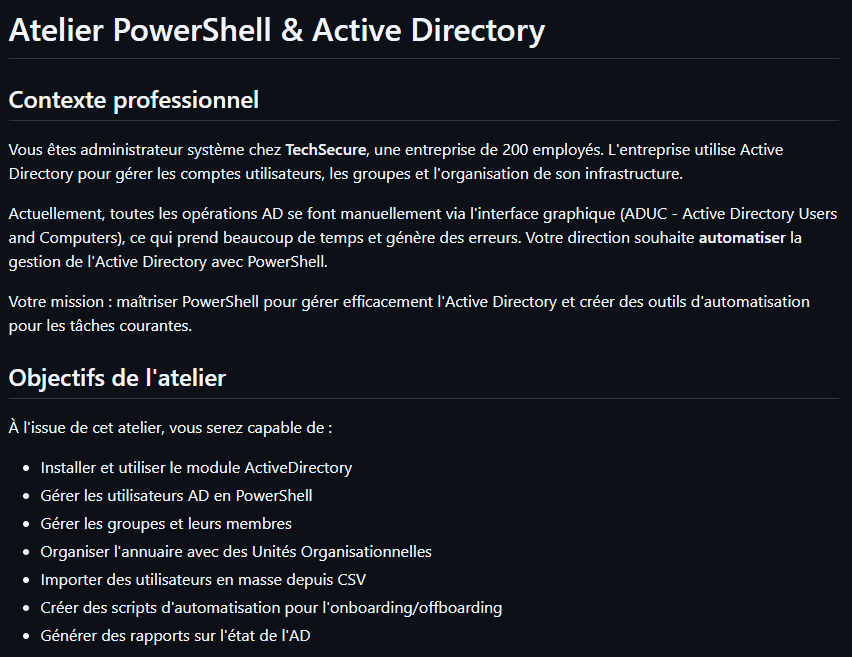
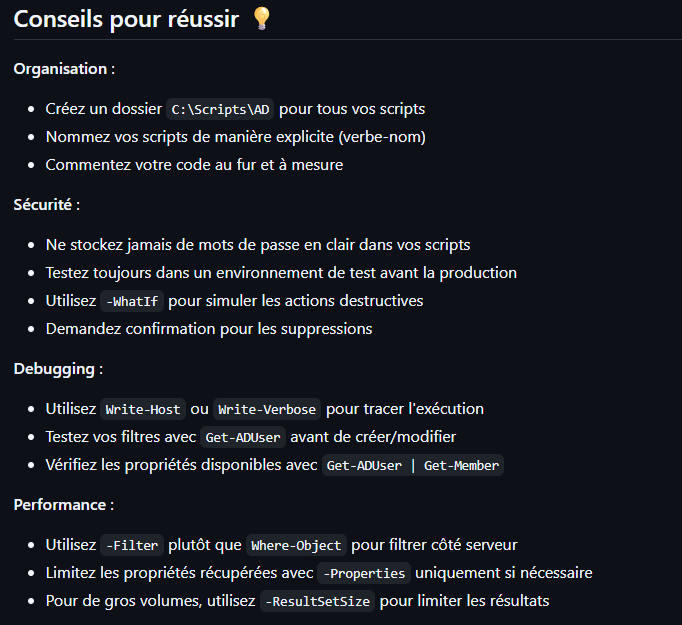
Atelier B405 : https://github.com/O-clock-Aldebaran/SB04E05-Atelier-Powershell-et-AD/blob/master/README.MD
Ressources utiles
Documentation Microsoft :
- Module ActiveDirectory : https://docs.microsoft.com/powershell/module/activedirectory/
- Gestion des utilisateurs AD : https://docs.microsoft.com/windows-server/identity/ad-ds/
Cmdlets essentielles :
- Utilisateurs :
Get-ADUser,New-ADUser,Set-ADUser,Remove-ADUser - Groupes :
Get-ADGroup,New-ADGroup,Add-ADGroupMember,Get-ADGroupMember - OU :
Get-ADOrganizationalUnit,New-ADOrganizationalUnit,Move-ADObject - Domaine :
Get-ADDomain,Get-ADForest,Get-ADDomainController
[Correction de l'atelier]https://github.com/O-clock-Aldebaran/correction-atelier-powershell
1. Module ActiveDirectory
On vérifie le module ActiveDirectory dans PowerShell

Avec Get-Command -Module ActiveDirectory on aura tous les cmdlets
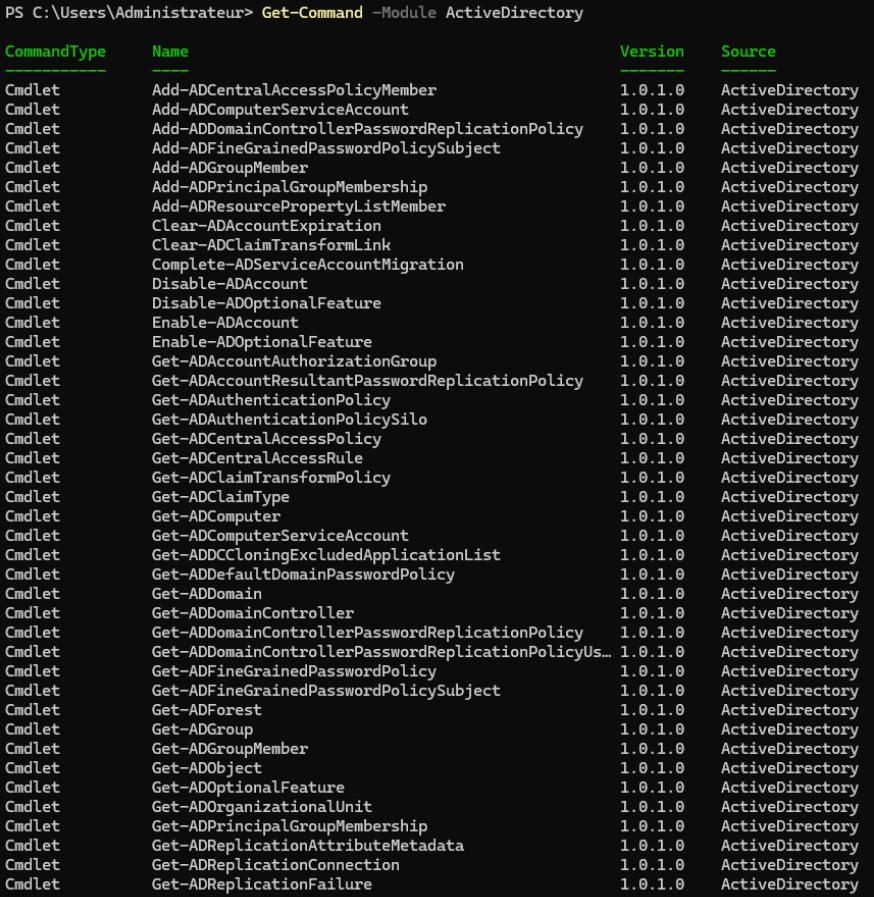
(Get-Command -Module ActiveDirectory).Count nous donne le total : 151 !
On cherche les cmdlets pour AdUser

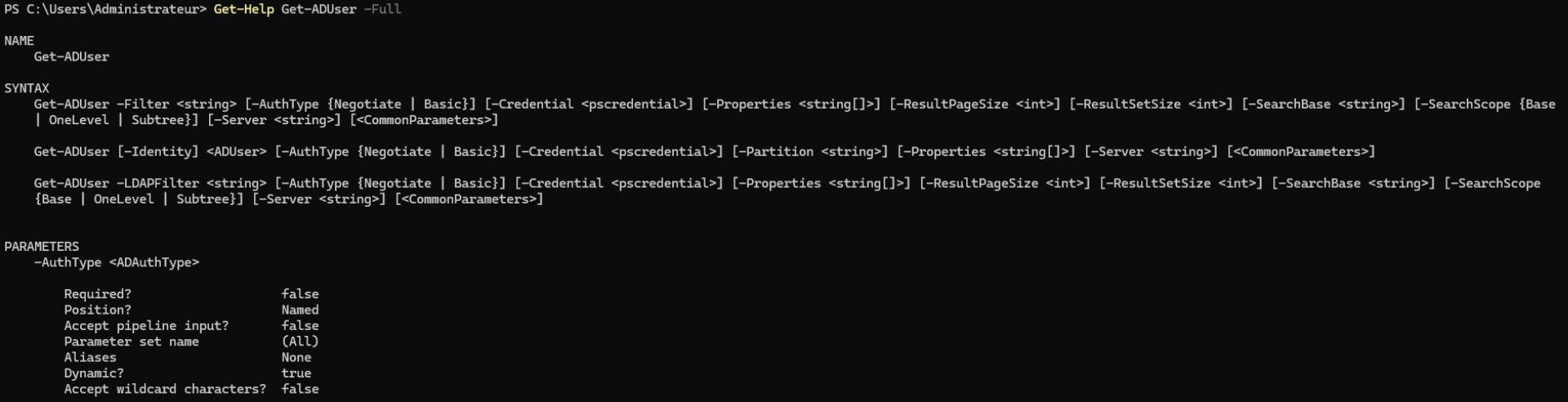
Avec Get-Help on peut voir toutes les syntaxes
On va regarder notre Domaine
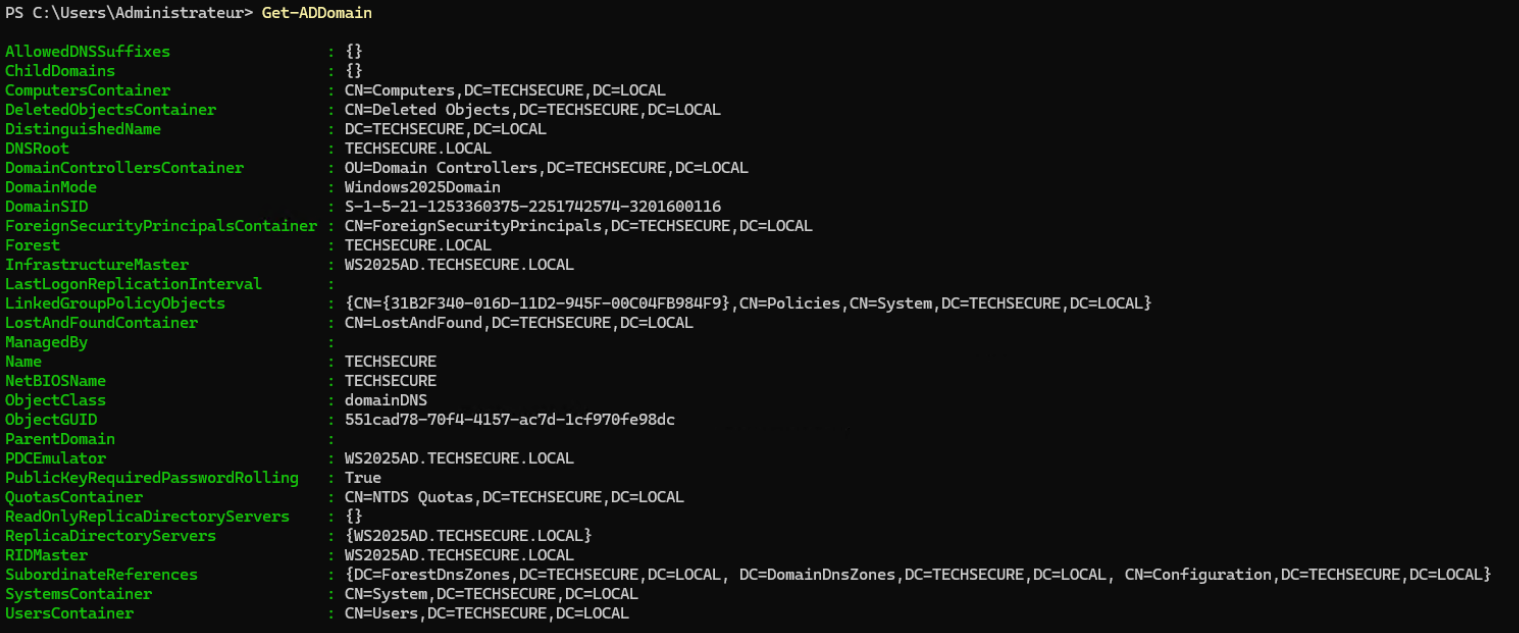
Pour afficher spécifiquement : Nom, Niveau fonctionnel, Contrôleurs; on utilise Select-Object pour filtrer (Note : ReplicaDirectoryServers liste les contrôleurs de domaine connus par le domaine).

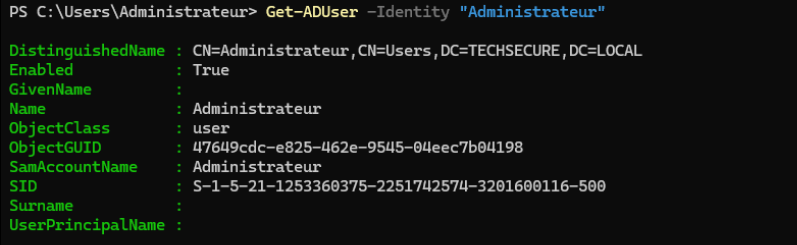
On va récupérer les informations de notre compte "Administrateur"
En détail avec -Properties la liste est conséquente
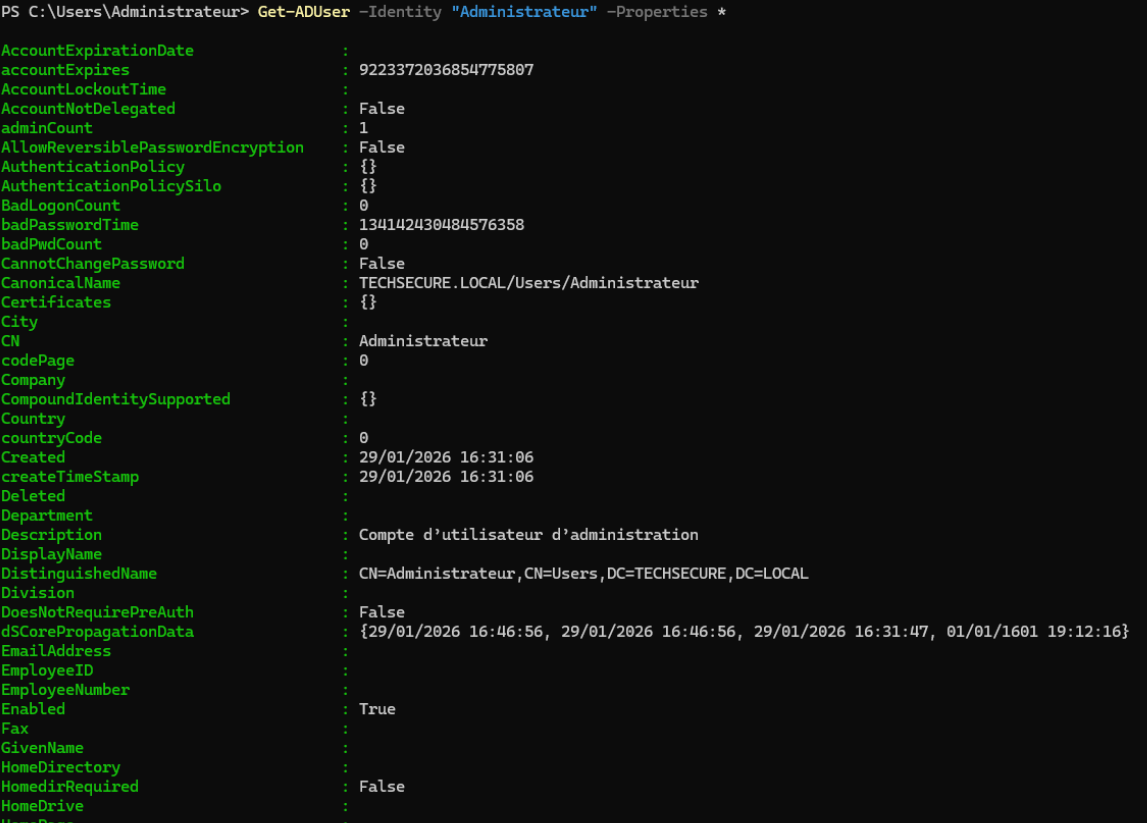
Donc on va utiliser un Pipe pour filtrer précisément

2. Gestion des utilisateurs
On va créer une Unité d'Organisation "Employes"
# Création de l'UO "Employes" à la racine du domaine
New-ADOrganizationalUnit -Name "Employes" -Path "DC=TECHSECURE,DC=LOCAL"

# Conversion du mot de passe en chaîne sécurisée
$SecurePass = ConvertTo-SecureString "P@ssw0rd123!" -AsPlainText -Force
On va ajouter nos utilisateurs en entrant tout les détails
    # Alice Martin
New-ADUser -Name "Alice Martin" `
    -GivenName "Alice" `
    -Surname "Martin" `
    -SamAccountName "amartin" `
    -UserPrincipalName "amartin@techsecure.local" `
    -EmailAddress "alice.martin@techsecure.fr" `
    -Title "Développeuse" `
    -AccountPassword $SecurePass `
    -Enabled $true `
    -ChangePasswordAtLogon $true `
    -Path "OU=Employes,DC=TECHSECURE,DC=LOCAL"

    # Bob Dubois
New-ADUser -Name "Bob Dubois" -GivenName "Bob" -Surname "Dubois" `
    -SamAccountName "bdubois" -UserPrincipalName "bdubois@techsecure.local" `
    -EmailAddress "bob.dubois@techsecure.fr" -Title "Administrateur Système" `
    -AccountPassword $SecurePass -Enabled $true -ChangePasswordAtLogon $true `
    -Path "OU=Employes,DC=TECHSECURE,DC=LOCAL"

# Claire Bernard
New-ADUser -Name "Claire Bernard" -GivenName "Claire" -Surname "Bernard" `
    -SamAccountName "cbernard" -UserPrincipalName "cbernard@techsecure.local" `
    -EmailAddress "claire.bernard@techsecure.fr" -Title "Chef de Projet" `
    -AccountPassword $SecurePass -Enabled $true -ChangePasswordAtLogon $true `
    -Path "OU=Employes,DC=TECHSECURE,DC=LOCAL"
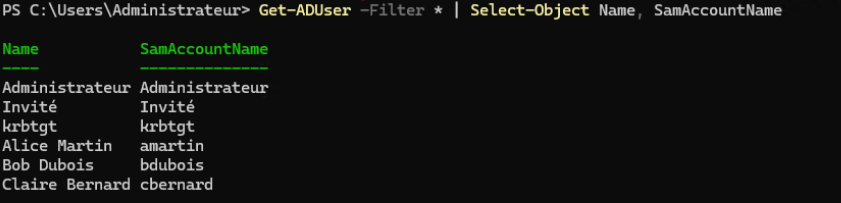
Avec Get-ADUser on aura toute la liste des utilisateurs, on filtre avec Selec Object pour que ce soit lisible
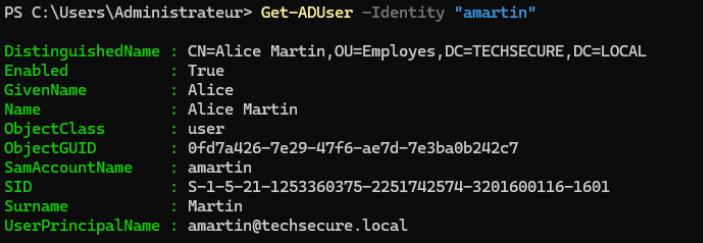
Pour chercher un utilisateur avec son login on utilise simplement -Identity
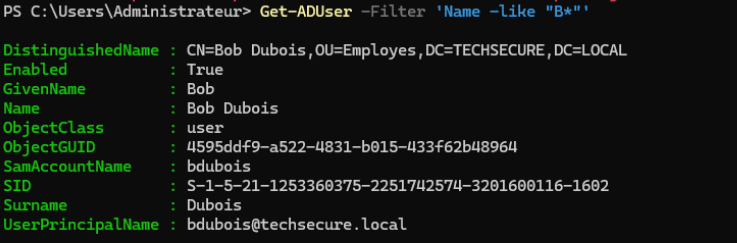
Pour trouver ceux dont le nom commence par B on utilise le filtre avec l'opérateur -like et l'astérisque * (wildcard) qui veut dire "n'importe quoi après"
Pour ceux qui sont Administrateurs, par défaut, Get-ADUser ne charge pas la propriété "Title". On doit forcer son chargement avec -Properties Title pour pouvoir l'afficher

Pour le nombre total un (Get-ADUser -Filter *).Count nous donne les 6
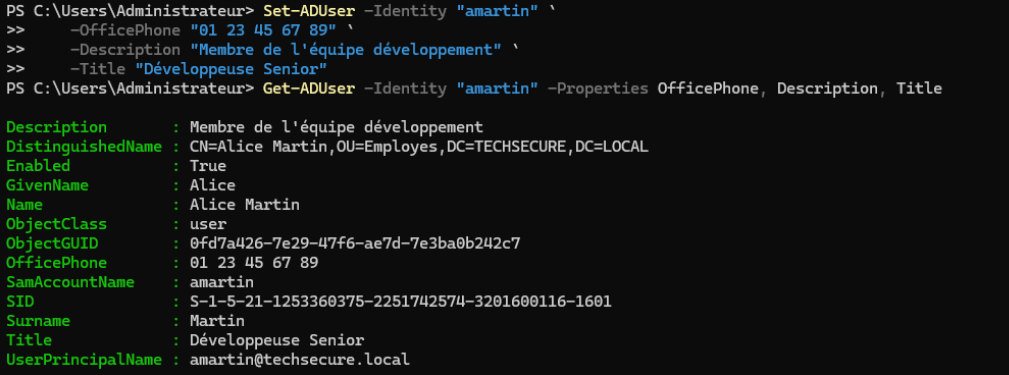
Pour modifier un utilisateur on utilise Set-ADUser, on ajoute les infos et on vérifie
Si un utilisateur part en vacances on peut le désactiver

Pour supprimer un utilisateur on nous demande de valider


3. Gestion des groupes
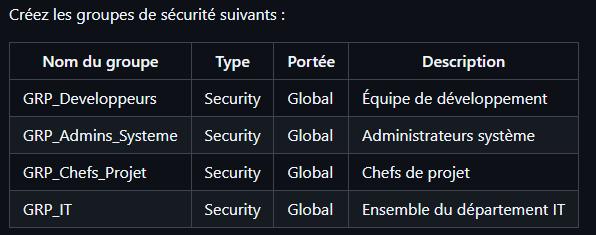
# Définition du chemin (OU)
$OU = "OU=Employes,DC=TECHSECURE,DC=LOCAL"

# GRP_Developpeurs
New-ADGroup -Name "GRP_Developpeurs" -GroupScope Global -GroupCategory Security -Description "Équipe de développement" -Path $OU

# GRP_Admins_Systeme
New-ADGroup -Name "GRP_Admins_Systeme" -GroupScope Global -GroupCategory Security -Description "Administrateurs système" -Path $OU

# GRP_Chefs_Projet
New-ADGroup -Name "GRP_Chefs_Projet" -GroupScope Global -GroupCategory Security -Description "Chefs de projet" -Path $OU

# GRP_IT
New-ADGroup -Name "GRP_IT" -GroupScope Global -GroupCategory Security -Description "Ensemble du département IT" -Path $OU
On va ajouter Alice et Bob dans leur groupes
Add-ADGroupMember -Identity "GRP_Developpeurs" -Members "amartin"
Add-ADGroupMember -Identity "GRP_Admins_Systeme" -Members "bdubois"
On va créer 2 nouveaux utilisateurs Dev, on doit les créer puis les ajouter au groupe
# Patrice Maldi
New-ADUser -Name "Patrice Maldi" -GivenName "Patrice" -Surname "Maldi" `
    -SamAccountName "pmaldi" -UserPrincipalName "pmaldi@techsecure.local" `
    -EmailAddress "patrice.maldi@techsecure.fr" -Title "Developpeur" `
    -AccountPassword $SecurePass -Enabled $true -ChangePasswordAtLogon $true `
    -Path "OU=Employes,DC=TECHSECURE,DC=LOCAL"

Add-ADGroupMember -Identity "GRP_Developpeurs" -Members "pmaldi"

# Baptiste Delphin
New-ADUser -Name "Baptiste Delphin" -GivenName "Baptiste" -Surname "Delphin" `
    -SamAccountName "bdelphin" -UserPrincipalName "bdelphin@techsecure.local" `
    -EmailAddress "baptiste.delphin@techsecure.fr" -Title "Developpeur" `
    -AccountPassword $SecurePass -Enabled $true -ChangePasswordAtLogon $true `
    -Path "OU=Employes,DC=TECHSECURE,DC=LOCAL"

Add-ADGroupMember -Identity "GRP_Developpeurs" -Members "bdelphin"
Pour ajouter tous les membres dans le groupe IT
Add-ADGroupMember -Identity "GRP_IT" -Members "amartin", "bdubois", "pmaldi", "bdelphin"
On peut lister pour vérifier
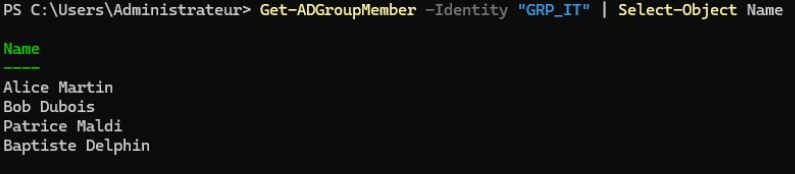
et afficher les groupes de amartin

Pour chaque groupe on va faire un (.Count)

Retrait d'Alice de GRP_IT et vérification
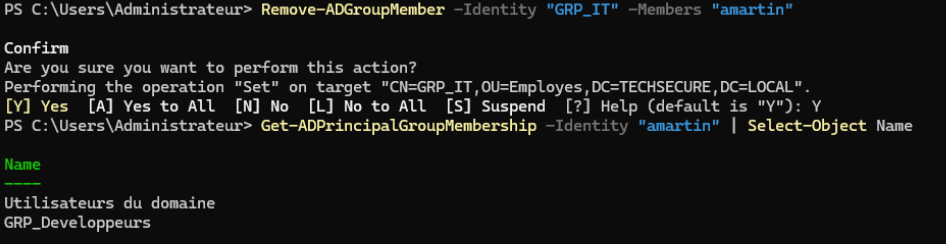
On va créer un groupe GRP_Tous_Utilisateurs et y imbriquer le GRP_IT
New-ADGroup -Name "GRP_Tous_Utilisateurs" -GroupScope Global -GroupCategory Security -Path "OU=Employes,DC=TECHSECURE,DC=LOCAL"
Add-ADGroupMember -Identity "GRP_Tous_Utilisateurs" -Members "GRP_IT"
On peut voir notre groupe IT bien ajouté, et en récursif on peut voir les utilisateurs qui en découlent
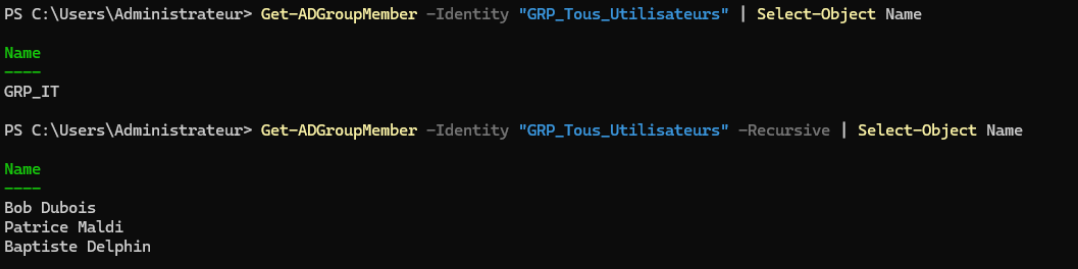
4. Organisation avec les Unités Organisationnelles (OU)
TechSecure/ ├── Utilisateurs/ │ ├── Informatique/ │ │ ├── Developpement/ │ │ └── Infrastructure/ │ ├── RH/ │ └── Commercial/ ├── Groupes/ └── Ordinateurs/
Pour retrouver cette organisation on va construire une arborescence
# La racine "TechSecure"
New-ADOrganizationalUnit -Name "TechSecure" -Path "DC=TECHSECURE,DC=LOCAL"

# Les 3 dossiers principaux dans TechSecure
New-ADOrganizationalUnit -Name "Utilisateurs" -Path "OU=TechSecure,DC=TECHSECURE,DC=LOCAL"
New-ADOrganizationalUnit -Name "Groupes" -Path "OU=TechSecure,DC=TECHSECURE,DC=LOCAL"
New-ADOrganizationalUnit -Name "Ordinateurs" -Path "OU=TechSecure,DC=TECHSECURE,DC=LOCAL"

# Les sous-dossiers dans "Utilisateurs"
New-ADOrganizationalUnit -Name "Informatique" -Path "OU=Utilisateurs,OU=TechSecure,DC=TECHSECURE,DC=LOCAL"
New-ADOrganizationalUnit -Name "RH" -Path "OU=Utilisateurs,OU=TechSecure,DC=TECHSECURE,DC=LOCAL"
New-ADOrganizationalUnit -Name "Commercial" -Path "OU=Utilisateurs,OU=TechSecure,DC=TECHSECURE,DC=LOCAL"

# Les derniers sous-dossiers dans "Informatique"
New-ADOrganizationalUnit -Name "Developpement" -Path "OU=Informatique,OU=Utilisateurs,OU=TechSecure,DC=TECHSECURE,DC=LOCAL"
New-ADOrganizationalUnit -Name "Infrastructure" -Path "OU=Informatique,OU=Utilisateurs,OU=TechSecure,DC=TECHSECURE,DC=LOCAL"
Maintenant qu'on a créé la structure on va déplacer amartin dans l'OU Dev (on doit mettre le chemin complet et absolu des OU)
Get-ADUser -Identity "amartin" | Move-ADObject -TargetPath "OU=Developpement,OU=Informatique,OU=Utilisateurs,OU=TechSecure,DC=TECHSECURE,DC=LOCAL"
Pour déplacer les groupes GRP dans l'OU Techsecure/Groupes
Get-ADGroup -Filter 'Name -like "GRP_*"' | Move-ADObject -TargetPath "OU=Groupes,OU=TechSecure,DC=TECHSECURE,DC=LOCAL"
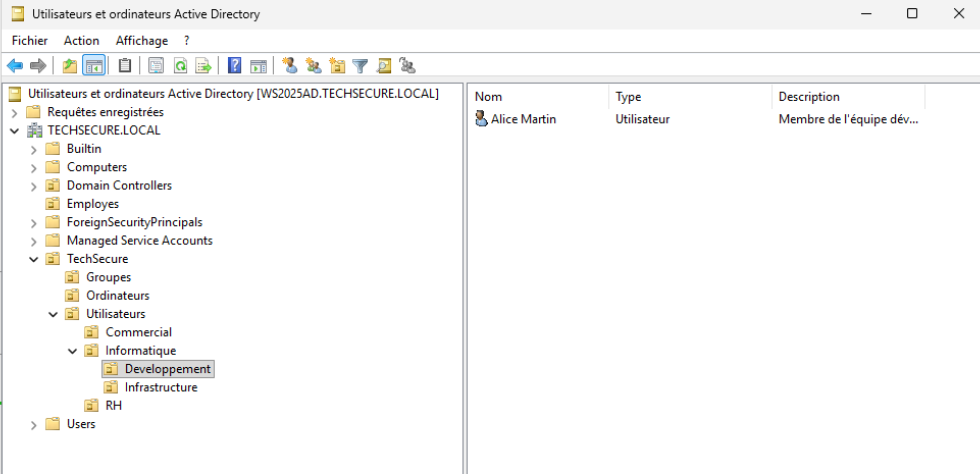
On peut vérifier que amartin qu'on a déplacé dans l'OU Dev est bien dans l'OU Info

Pour compter le nbre d'utilisateurs dans l'OU "Informatique" uniquement (sans les sous-OU) c'est avec le Scope OneLevel

Pour le nombre d'utilisateurs dans l'OU "Informatique" en incluant tous les sous-niveaux, Scope Subtree, et on ajoute un @ pour forcer PowerShell a compter un seul utilisateur comme une liste

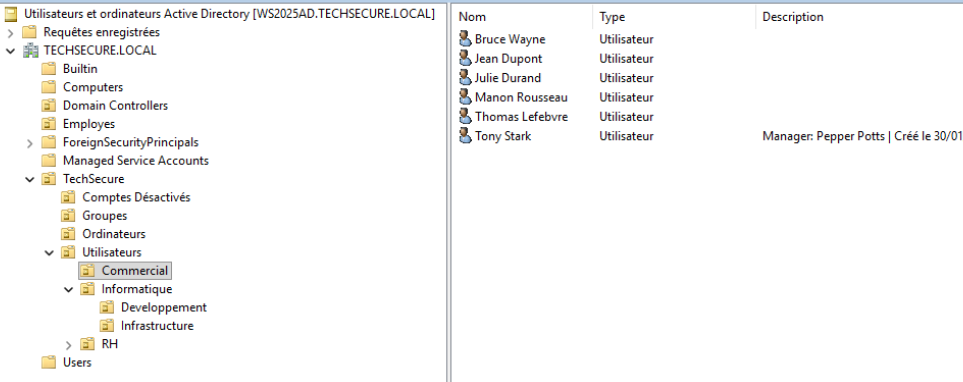
On peut aussi vérifier dans notre AD via l'interface
5. Import en masse depuis CSV
Ajout d'un fichier nouveaux_employes.csv dans C:\Scripts\AD\ avec des nouveaux employés
Prenom,Nom,Login,Email,Titre,Departement,OU
David,Petit,dpetit,david.petit@techsecure.fr,Développeur,Informatique,"OU=Developpement,OU=Informatique,OU=Utilisateurs,OU=TechSecure,DC=TECHSECURE,DC=LOCAL"
Emma,Roux,eroux,emma.roux@techsecure.fr,Administratrice Réseau,Informatique,"OU=Infrastructure,OU=Informatique,OU=Utilisateurs,OU=TechSecure,DC=TECHSECURE,DC=LOCAL"
François,Moreau,fmoreau,francois.moreau@techsecure.fr,Recruteur,RH,"OU=RH,OU=Utilisateurs,OU=TechSecure,DC=TECHSECURE,DC=LOCAL"
Julie,Durand,jdurand,julie.durand@techsecure.fr,Commerciale,Commercial,"OU=Commercial,OU=Utilisateurs,OU=TechSecure,DC=TECHSECURE,DC=LOCAL"
Thomas,Lefebvre,tlefebvre,thomas.lefebvre@techsecure.fr,Commercial,Commercial,"OU=Commercial,OU=Utilisateurs,OU=TechSecure,DC=TECHSECURE,DC=LOCAL"
Sophie,Martin,smartin,sophie.martin@techsecure.fr,Développeuse,Informatique,"OU=Developpement,OU=Informatique,OU=Utilisateurs,OU=TechSecure,DC=TECHSECURE,DC=LOCAL"
Lucas,Bernard,lbernard,lucas.bernard@techsecure.fr,SysAdmin,Informatique,"OU=Infrastructure,OU=Informatique,OU=Utilisateurs,OU=TechSecure,DC=TECHSECURE,DC=LOCAL"
Camille,Dubois,cdubois,camille.dubois@techsecure.fr,DRH,RH,"OU=RH,OU=Utilisateurs,OU=TechSecure,DC=TECHSECURE,DC=LOCAL"
Antoine,Leroy,aleroy,antoine.leroy@techsecure.fr,Stagiaire Dev,Informatique,"OU=Developpement,OU=Informatique,OU=Utilisateurs,OU=TechSecure,DC=TECHSECURE,DC=LOCAL"
Manon,Rousseau,mrousseau,manon.rousseau@techsecure.fr,Responsable Ventes,Commercial,"OU=Commercial,OU=Utilisateurs,OU=TechSecure,DC=TECHSECURE,DC=LOCAL"
Nicolas,Blanc,nblanc,nicolas.blanc@techsecure.fr,Support IT,Informatique,"OU=Infrastructure,OU=Informatique,OU=Utilisateurs,OU=TechSecure,DC=TECHSECURE,DC=LOCAL"
Lea,Garnier,lgarnier,lea.garnier@techsecure.fr,Comptable,RH,"OU=RH,OU=Utilisateurs,OU=TechSecure,DC=TECHSECURE,DC=LOCAL"
Pierre,Faure,pfaure,pierre.faure@techsecure.fr,Architecte Réseau,Informatique,"OU=Infrastructure,OU=Informatique,OU=Utilisateurs,OU=TechSecure,DC=TECHSECURE,DC=LOCAL"
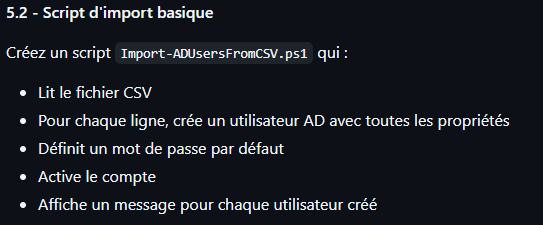
# Chemin vers le fichier CS
$CsvPath = "C:\Scripts\AD\nouveaux_employes.csv"

# Mot de passe par défaut pour tout le monde (Sécurisé)
$SecurePass = ConvertTo-SecureString "Bienvenue123!" -AsPlainText -Force

# Importation du CSV
$Utilisateurs = Import-Csv -Path $CsvPath -Delimiter ","

# Boucle sur chaque ligne du CSV
foreach ($User in $Utilisateurs) {

    # Construction du nom de connexion (UPN) : login + @domaine
    $UPN = $User.Login + "@techsecure.local"

    # Message d'information
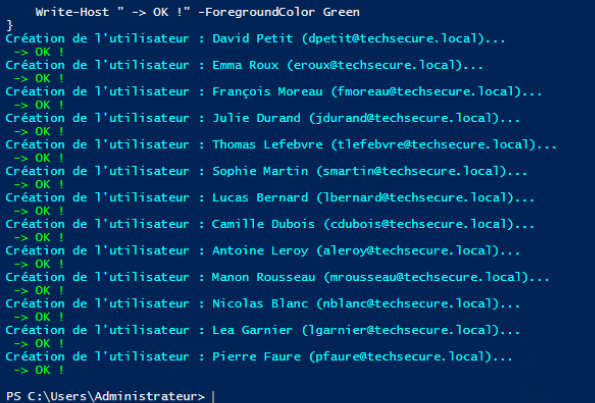
    Write-Host "Création de l'utilisateur : $($User.Prenom) $($User.Nom) ($UPN)..." -ForegroundColor Cyan

    # La commande de création
    New-ADUser -Name "$($User.Prenom) $($User.Nom)" `
        -GivenName $User.Prenom `
        -Surname $User.Nom `
        -SamAccountName $User.Login `
        -UserPrincipalName $UPN `
        -EmailAddress $User.Email `
        -Title $User.Titre `
        -Department $User.Departement `
        -Path $User.OU `
        -AccountPassword $SecurePass `
        -Enabled $true `
        -ChangePasswordAtLogon $true

    Write-Host " -> OK !" -ForegroundColor Green
}
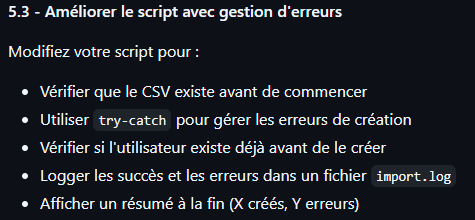
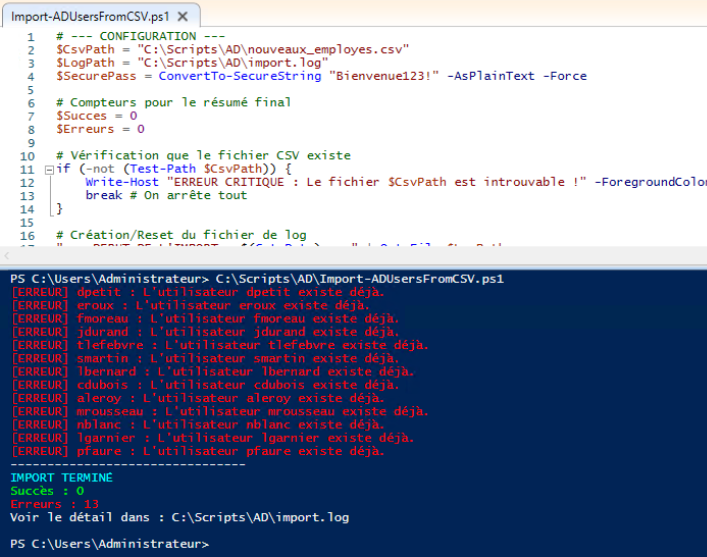
# --- CONFIGURATION ---
$CsvPath = "C:\Scripts\AD\nouveaux_employes.csv"
$LogPath = "C:\Scripts\AD\import.log"
$SecurePass = ConvertTo-SecureString "Bienvenue123!" -AsPlainText -Force

# Compteurs pour le résumé final
$Succes = 0
$Erreurs = 0

# 1. Vérification que le fichier CSV existe
if (-not (Test-Path $CsvPath)) {
    Write-Host "ERREUR CRITIQUE : Le fichier $CsvPath est introuvable !" -ForegroundColor Red
    break # On arrête tout
}

# Création/Reset du fichier de log
"--- DEBUT DE L'IMPORT : $(Get-Date) ---" | Out-File $LogPath

# Importation des données
$Utilisateurs = Import-Csv -Path $CsvPath -Delimiter ","

foreach ($User in $Utilisateurs) {
    $UPN = $User.Login + "@techsecure.local"

    # --- DEBUT DU BLOC DE SECURITE (TRY/CATCH) ---
    try {
        # 2. Vérifier si l'utilisateur existe déjà
        if (Get-ADUser -Filter "SamAccountName -eq '$($User.Login)'" -ErrorAction SilentlyContinue) {
            # Si on le trouve, on déclenche une erreur manuelle pour aller dans le "Catch"
            throw "L'utilisateur $($User.Login) existe déjà."
        }

        # 3. Création de l'utilisateur
        New-ADUser -Name "$($User.Prenom) $($User.Nom)" `
            -GivenName $User.Prenom `
            -Surname $User.Nom `
            -SamAccountName $User.Login `
            -UserPrincipalName $UPN `
            -EmailAddress $User.Email `
            -Title $User.Titre `
            -Department $User.Departement `
            -Path $User.OU `
            -AccountPassword $SecurePass `
            -Enabled $true `
            -ChangePasswordAtLogon $true -ErrorAction Stop

        Write-Host "[OK] Création de $($User.Login)" -ForegroundColor Green
        Add-Content -Path $LogPath -Value "[SUCCES] Utilisateur créé : $($User.Login)"

        # 4. Gestion des Groupes (Partie 5.4)
        if (-not [string]::IsNullOrWhiteSpace($User.Groupes)) {
            # On coupe la liste par les points-virgules
            $ListeGroupes = $User.Groupes -split ";"
            foreach ($Grp in $ListeGroupes) {
                Add-ADGroupMember -Identity $Grp -Members $User.Login
                Add-Content -Path $LogPath -Value "    -> Ajouté au groupe : $Grp"
            }
        }

        $Succes++
    }
    catch {
        # C'est ici qu'on atterrit s'il y a une erreur (utilisateur existant ou autre)
        $MsgErreur = $_.Exception.Message
        Write-Host "[ERREUR] $($User.Login) : $MsgErreur" -ForegroundColor Red
        Add-Content -Path $LogPath -Value "[ECHEC] $($User.Login) : $MsgErreur"
        $Erreurs++
    }
}

# --- RESUME FINAL ---
Write-Host "--------------------------------"
Write-Host "IMPORT TERMINÉ" -ForegroundColor Cyan
Write-Host "Succès : $Succes" -ForegroundColor Green
Write-Host "Erreurs : $Erreurs" -ForegroundColor Red
Write-Host "Voir le détail dans : $LogPath"
On a déjà créé nos utilisateurs dans le script précédent, on a donc des erreurs en retour
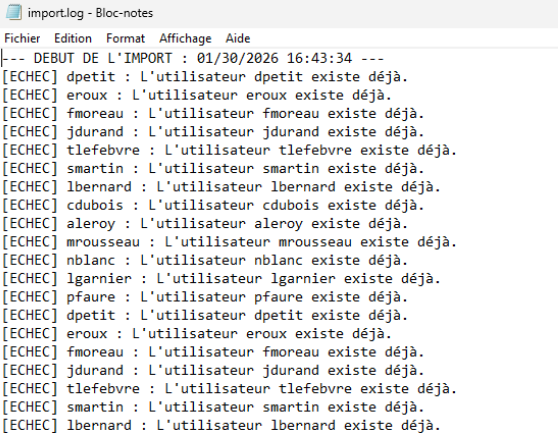
Et dans le fichier Log
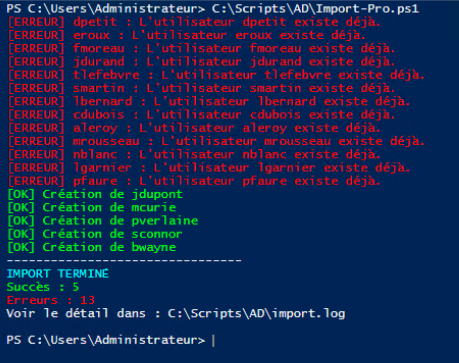
On va ajouter des nouveaux utilisateurs (et une colonne groupe)
6. Scripts d'automatisation
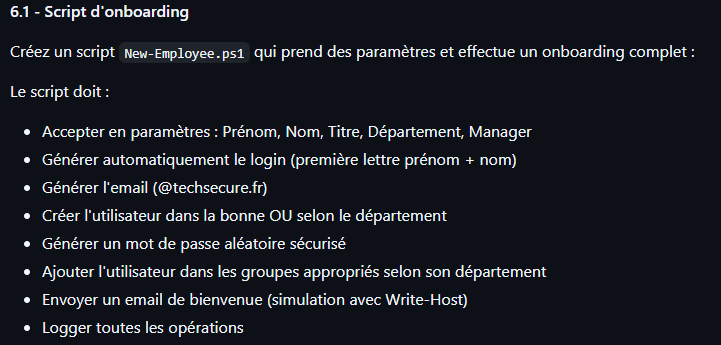
Le script New-Employee.ps1
# SYNOPSIS
# Script d'onboarding automatique pour TechSecure.
# DESCRIPTION
# Crée l'utilisateur, génère le login/pass, place dans la bonne OU et ajoute aux groupes.
# EXAMPLE
# .\New-Employee.ps1 -Prenom "Thomas" -Nom "Anderson" -Titre "Architecte" -Departement "Infra" -Manager "Smith"


param(
    [Parameter(Mandatory=$true)] [string]$Prenom,
    [Parameter(Mandatory=$true)] [string]$Nom,
    [Parameter(Mandatory=$true)] [string]$Titre,
    [Parameter(Mandatory=$true)] [ValidateSet("RH","Commercial","Dev","Infra")] [string]$Departement,
    [string]$Manager = "Non défini"
)

# --- CONFIGURATION ---
$LogPath = "C:\Scripts\AD\onboarding.log"
$Domain = "techsecure.local"
$DomainEmail = "techsecure.fr"

# --- 1. GENERATION DES INFOS ---

# Login : 1ère lettre du prénom + Nom (ex: tanderson)
$Login = ($Prenom.Substring(0,1) + $Nom).ToLower()
$UPN = "$Login@$Domain"
$Email = "$($Prenom).$($Nom)@$DomainEmail".ToLower()

# Mot de passe aléatoire (8 caractères)
$RandomPass = -join ((33..126) | Get-Random -Count 10 | ForEach-Object {[char]$_})
$SecurePass = ConvertTo-SecureString $RandomPass -AsPlainText -Force

# --- 2. LOGIQUE INTELLIGENTE (OU & GROUPES) ---
# Selon le département choisi, on définit l'OU et les Groupes
switch ($Departement) {
    "RH" {
        $TargetOU = "OU=RH,OU=Utilisateurs,OU=TechSecure,DC=TECHSECURE,DC=LOCAL"
        $Groupes = @("GRP_RH")
    }
    "Commercial" {
        $TargetOU = "OU=Commercial,OU=Utilisateurs,OU=TechSecure,DC=TECHSECURE,DC=LOCAL"
        $Groupes = @("GRP_Commerciaux")
    }
    "Dev" {
        $TargetOU = "OU=Developpement,OU=Informatique,OU=Utilisateurs,OU=TechSecure,DC=TECHSECURE,DC=LOCAL"
        $Groupes = @("GRP_Developpeurs", "GRP_IT")
    }
    "Infra" {
        $TargetOU = "OU=Infrastructure,OU=Informatique,OU=Utilisateurs,OU=TechSecure,DC=TECHSECURE,DC=LOCAL"
        $Groupes = @("GRP_Admins_Systeme", "GRP_IT")
    }
}

# --- 3. EXECUTION ---
"--- NOUVEL ARRIVANT : $(Get-Date) ---" | Out-File $LogPath -Append

try {
    # Vérification existance
    if (Get-ADUser -Filter "SamAccountName -eq '$Login'" -ErrorAction SilentlyContinue) {
        throw "L'utilisateur $Login existe déjà !"
    }

    Write-Host "Création de $Prenom $Nom ($Login)..." -ForegroundColor Cyan

    # Création AD
    New-ADUser -Name "$Prenom $Nom" `
        -GivenName $Prenom `
        -Surname $Nom `
        -SamAccountName $Login `
        -UserPrincipalName $UPN `
        -EmailAddress $Email `
        -Title $Titre `
        -Department $Departement `
        -Description "Manager: $Manager | Créé le $(Get-Date -Format 'dd/MM/yyyy')" `
        -Path $TargetOU `
        -AccountPassword $SecurePass `
        -Enabled $true `
        -ChangePasswordAtLogon $true `
        -ErrorAction Stop

    # Ajout aux groupes
    foreach ($Grp in $Groupes) {
        Add-ADGroupMember -Identity $Grp -Members $Login
        Write-Host " -> Ajouté au groupe $Grp" -ForegroundColor Gray
    }

    # Simulation Email
    Write-Host ""
    Write-Host "📧 [SIMULATION EMAIL] Envoyé à $Manager :" -ForegroundColor Yellow
    Write-Host "   Bienvenue à $Prenom $Nom. Login: $Login | MDP Provisoire: $RandomPass" -ForegroundColor Yellow
    Write-Host ""

    # Log Succès
    Add-Content -Path $LogPath -Value "[SUCCES] Création de $Login ($Departement). Manager: $Manager"
    Write-Host "TERMINE AVEC SUCCES !" -ForegroundColor Green

}
catch {
    $Err = $_.Exception.Message
    Write-Host "ERREUR : $Err" -ForegroundColor Red
    Add-Content -Path $LogPath -Value "[ERREUR] Tentative $Login : $Err"
}
Test du script avec un nouvel utilisateur

On va créer une nouvelle OU pour les comptes désactivés
New-ADOrganizationalUnit -Name "Comptes Désactivés" -Path "OU=TechSecure,DC=TECHSECURE,DC=LOCAL"
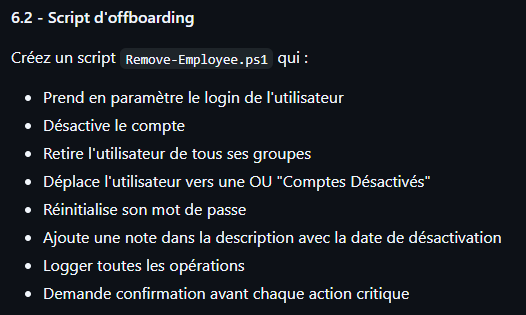
Le script Remove-Employee.ps1
# SYNOPSIS
# Script d'offboarding sécurisé pour TechSecure.
# DESCRIPTION
# Désactive, déplace, retire les groupes et archive un utilisateur.
# EXAMPLE
# .\Remove-Employee.ps1 -Login "tanderson"

param(
    [Parameter(Mandatory=$true)] [string]$Login
)

# --- CONFIGURATION ---
$LogPath = "C:\Scripts\AD\offboarding.log"
$TargetOU = "OU=Comptes Désactivés,OU=TechSecure,DC=TECHSECURE,DC=LOCAL"
$SecurePass = ConvertTo-SecureString "Désactivé@2026!" -AsPlainText -Force

# --- FONCTION DE LOG ---
function Log-Action ($Message, $Type="INFO") {
    $Line = "[$(Get-Date -Format 'yyyy-MM-dd HH:mm:ss')] [$Type] $Message"
    Add-Content -Path $LogPath -Value $Line
    if ($Type -eq "INFO") { Write-Host $Message -ForegroundColor Cyan }
    elseif ($Type -eq "SUCCESS") { Write-Host $Message -ForegroundColor Green }
    elseif ($Type -eq "WARNING") { Write-Host $Message -ForegroundColor Yellow }
    elseif ($Type -eq "ERROR") { Write-Host $Message -ForegroundColor Red }
}

try {
    # 1. Vérification de l'utilisateur
    $User = Get-ADUser -Identity $Login -Properties MemberOf, Description
    Log-Action "Début de la procédure de départ pour : $($User.Name) ($Login)"

    # 2. CONFIRMATION DE SECURITE
    $Confirmation = Read-Host "⚠️  ATTENTION : Vous allez désactiver $Login. Tapez 'OUI' pour confirmer"
    if ($Confirmation -ne "OUI") {
        throw "Annulation par l'administrateur."
    }

    # 3. Désactivation du compte
    Disable-ADAccount -Identity $Login
    Log-Action "Compte désactivé." "SUCCESS"

    # 4. Retrait des groupes (Sauf "Utilisateurs du domaine" qui est intouchable)
    $Groupes = Get-ADPrincipalGroupMembership -Identity $Login | Where-Object { $_.Name -ne "Utilisateurs du domaine" -and $_.Name -ne "Domain Users" }

    if ($Groupes) {
        foreach ($Grp in $Groupes) {
            Remove-ADGroupMember -Identity $Grp -Members $Login -Confirm:$false
            Log-Action "Retiré du groupe : $($Grp.Name)" "INFO"
        }
    } else {
        Log-Action "Aucun groupe secondaire à retirer." "WARNING"
    }

    # 5. Réinitialisation du mot de passe (pour empêcher toute reconnexion future)
    Set-ADAccountPassword -Identity $Login -NewPassword $SecurePass -Reset
    Log-Action "Mot de passe réinitialisé." "SUCCESS"

    # 6. Ajout de la note de départ
    $DateDepart = Get-Date -Format "dd/MM/yyyy"
    $NewDesc = "DÉSACTIVÉ le $DateDepart | Ancienne desc: $($User.Description)"
    Set-ADUser -Identity $Login -Description $NewDesc
    Log-Action "Description mise à jour." "SUCCESS"

    # 7. Déplacement vers l'OU d'archive
    Move-ADObject -Identity $User -TargetPath $TargetOU
    Log-Action "Utilisateur déplacé vers 'Comptes Désactivés'." "SUCCESS"

    Log-Action "PROCÉDURE TERMINÉE POUR $Login" "SUCCESS"
}
catch {
    Log-Action "ERREUR CRITIQUE : $($_.Exception.Message)" "ERROR"
}
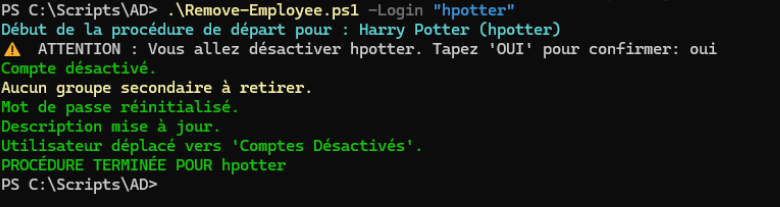
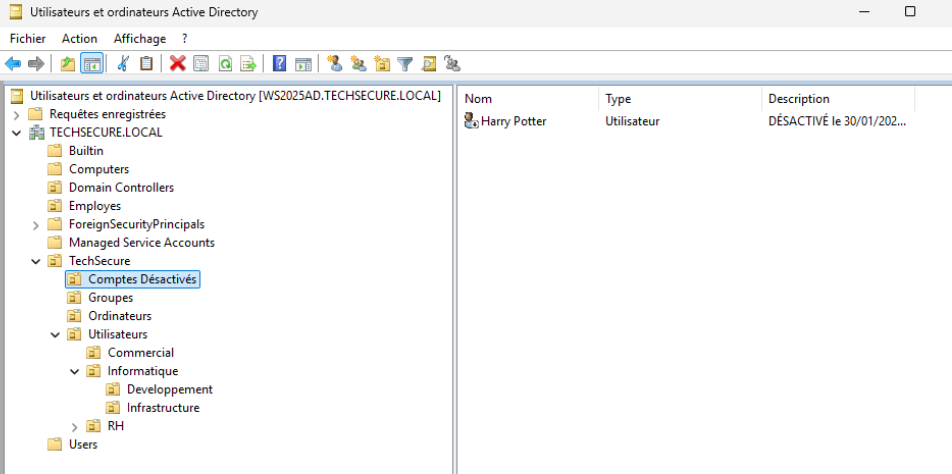
On va supprimer hpotter de Poudlard notre AD
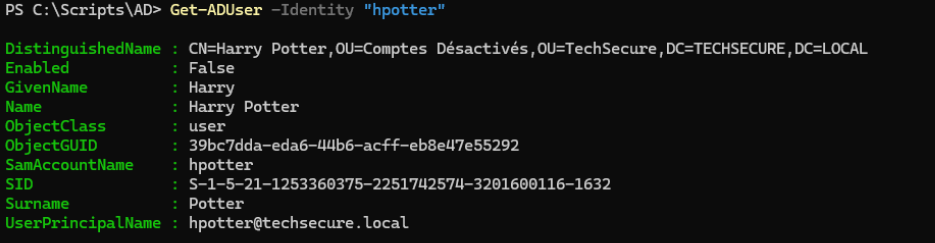
Notre utilisateur supprimé est bien dans l'OU Compte Désactivés
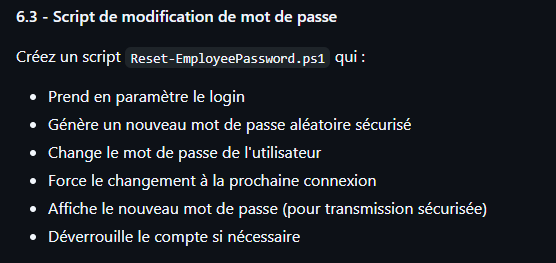
Le script Reset-EmployeePassword.ps1
# SYNOPSIS
# Réinitialise le mot de passe d'un utilisateur et déverrouille le compte.
# EXAMPLE
# .\Reset-EmployeePassword.ps1 -Login "dpetit"
#

param(
    [Parameter(Mandatory=$true)] [string]$Login
)

# --- CONFIGURATION ---
# Génération d'un mot de passe aléatoire (10 caractères complexes)
$RandomPass = -join ((33..126) | Get-Random -Count 10 | ForEach-Object {[char]$_})
$SecurePass = ConvertTo-SecureString $RandomPass -AsPlainText -Force

try {
    # 1. Vérif si l'utilisateur existe
    $User = Get-ADUser -Identity $Login -Properties Name

    # 2. Reset du mot de passe
    # Note : Le paramètre -Reset suffit (pas besoin de $true)
    Set-ADAccountPassword -Identity $Login -NewPassword $SecurePass -Reset

    # 3. Forcer le changement à la prochaine connexion
    Set-ADUser -Identity $Login -ChangePasswordAtLogon $true

    # 4. Déverrouiller le compte (au cas où il serait bloqué)
    Unlock-ADAccount -Identity $Login

    # 5. Affichage pour l'admin
    Write-Host ""
    Write-Host "✅ SUCCÈS pour l'utilisateur : $($User.Name)" -ForegroundColor Green
    Write-Host "---------------------------------------------"
    Write-Host "🔓 Compte déverrouillé."
    Write-Host "🔑 Nouveau mot de passe temporaire : $RandomPass" -ForegroundColor Yellow
    Write-Host "⚠️  L'utilisateur devra le changer à la connexion."
    Write-Host "---------------------------------------------"
    Write-Host ""
}
catch {
    Write-Host "❌ ERREUR : $($_.Exception.Message)" -ForegroundColor Red
}
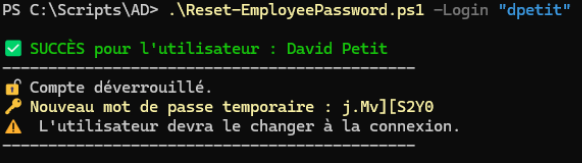
Le test de reset password pour dpetit
7. Rapports et audits
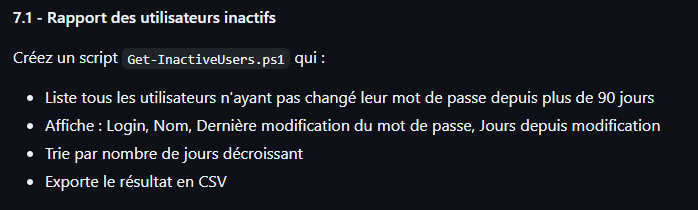
Le script pour les utilisateurs inactifs : Get-InactiveUsers.ps1
On va tester avec 0 jour d'anciennté sinon rien ne sortira
$JoursMax = 0
$DateLimite = (Get-Date).AddDays(-$JoursMax)
$CsvPath = "C:\Scripts\AD\Rapport_Inactifs.csv"

$Users = Get-ADUser -Filter {Enabled -eq $true} -Properties PasswordLastSet

$Rapport = @()

foreach ($User in $Users) {
    # On vérifie d'abord si la date existe (n'est pas nulle)
    if ($null -ne $User.PasswordLastSet) {
        if ($User.PasswordLastSet -lt $DateLimite) {
            $NbJours = New-TimeSpan -Start $User.PasswordLastSet -End (Get-Date)

            $Rapport += [PSCustomObject]@{
                Login = $User.SamAccountName
                Nom = $User.Name
                DernierChangementMDP = $User.PasswordLastSet
                JoursDepuisChangement = $NbJours.Days
            }
        }
    }
}

$Rapport | Sort-Object JoursDepuisChangement -Descending | Export-Csv -Path $CsvPath -NoTypeInformation -Encoding UTF8 -Delimiter ";"
Write-Host "✅ Rapport généré sans erreur : $CsvPath" -ForegroundColor Green
$Rapport | Format-Table -AutoSize
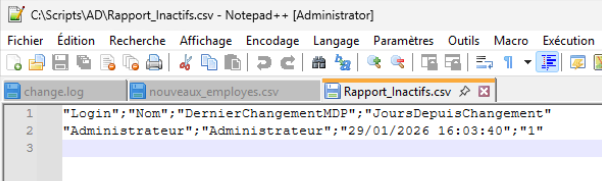
Comme on se base sur le changement de mot de passe et que le plupart ne l'ont encore jamais activé, seuln l'admin ressort

le log
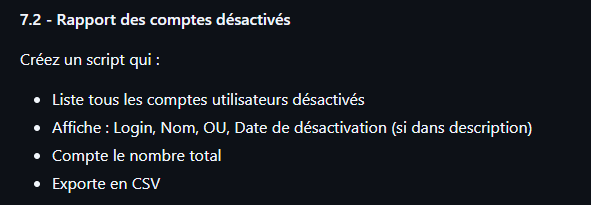
Le script Get-DisabledUsers.ps1
$CsvPath = "C:\Scripts\AD\Rapport_Desactives.csv"

# On cherche les comptes désactivés
$DisabledUsers = Get-ADUser -Filter {Enabled -eq $false} -Properties Description, LastLogonDate

$ListeFinale = @()

foreach ($User in $DisabledUsers) {
    # On essaie d'extraire la date si elle est dans la description (Format "DÉSACTIVÉ le ...")
    $DateDesac = "Inconnue"
    if ($User.Description -match "DÉSACTIVÉ le (\d{2}/\d{2}/\d{4})") {
        $DateDesac = $matches[1]
    }

    $ListeFinale += [PSCustomObject]@{
        Login = $User.SamAccountName
        Nom = $User.Name
        OU = $User.DistinguishedName.Split(",")[1].Replace("OU=","") # Petite astuce pour chopper l'OU parent
        DateDesactivation = $DateDesac
        DescriptionComplete = $User.Description
    }
}

# Export
$ListeFinale | Export-Csv -Path $CsvPath -NoTypeInformation -Encoding UTF8 -Delimiter ";"

Write-Host "✅ Rapport des comptes désactivés généré ($($ListeFinale.Count) comptes) : $CsvPath" -ForegroundColor Green
$ListeFinale | Format-Table Login, DateDesactivation, OU -AutoSize

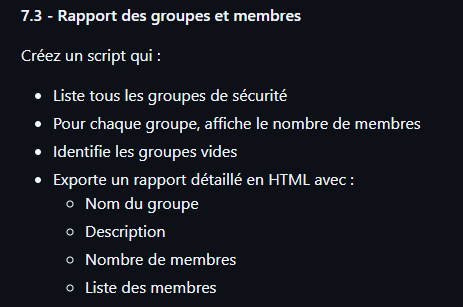
Le script Get-GroupsReport.ps1 pour le rapport HTML
$HtmlPath = "C:\Scripts\AD\Rapport_Groupes.html"

# Récupération des groupes et de leurs membres
$Groups = Get-ADGroup -Filter * -Properties Description, Members

$Data = @()

foreach ($Grp in $Groups) {
    $NbMembres = ($Grp.Members).Count

    # On définit si le groupe est vide ou non
    $Statut = if ($NbMembres -eq 0) { "⚠️ VIDE" } else { "$NbMembres membres" }

    $Data += [PSCustomObject]@{
        Nom = $Grp.Name
        Description = $Grp.Description
        Statut = $Statut
        Membres = ($Grp.Members -join ", ") # Liste des membres séparés par virgule
    }
}

# Conversion en HTML avec un peu de style CSS (couleurs)
$Header = @"
<style>
    body { font-family: sans-serif; }
    table { border-collapse: collapse; width: 100%; }
    th { background-color: #003366; color: white; padding: 10px; }
    td { border: 1px solid #ddd; padding: 8px; }
    tr:nth-child(even) { background-color: #f2f2f2; }
</style>
"@

$Data | ConvertTo-Html -Title "Rapport des Groupes TechSecure" -Head $Header | Out-File $HtmlPath

Write-Host "✅ Rapport HTML généré : $HtmlPath" -ForegroundColor Green
# Ouvre le rapport automatiquement
Invoke-Item $HtmlPath
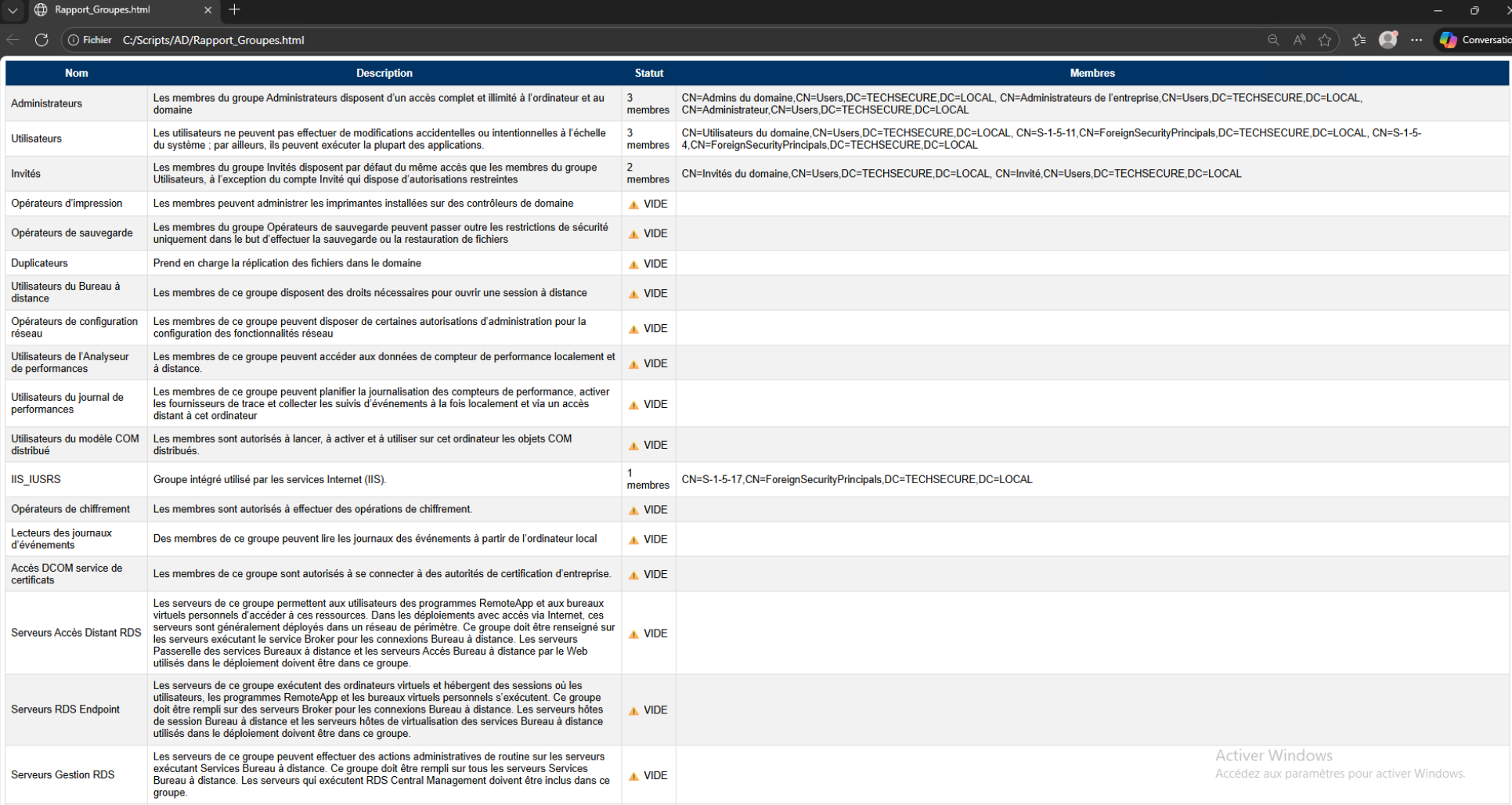
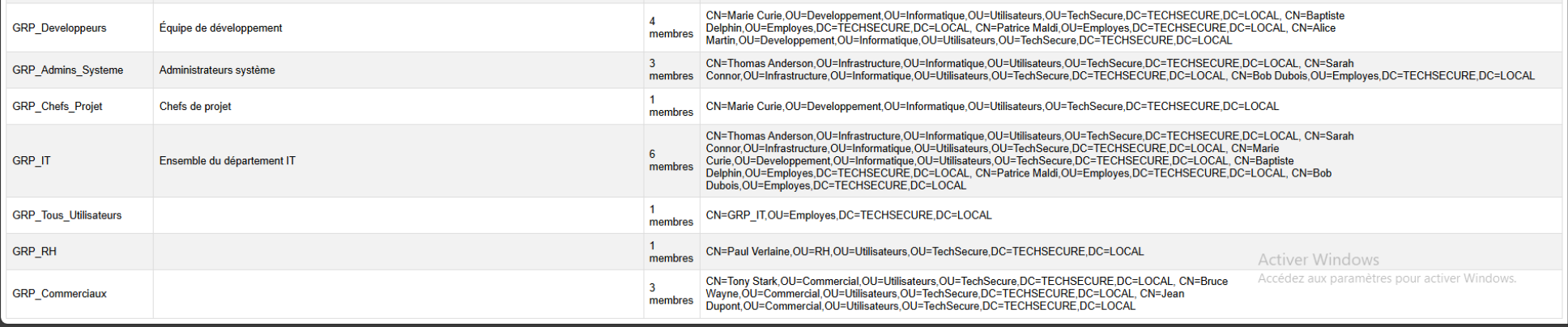
Nous donne un tableau HTML complet
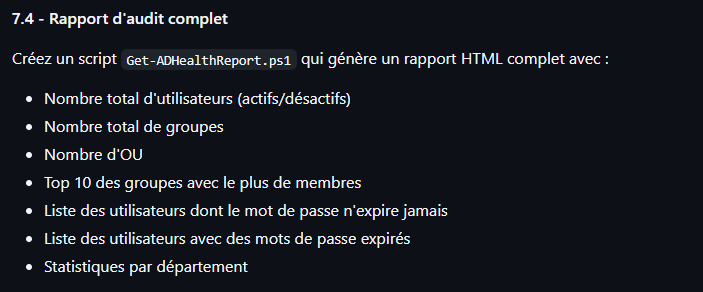
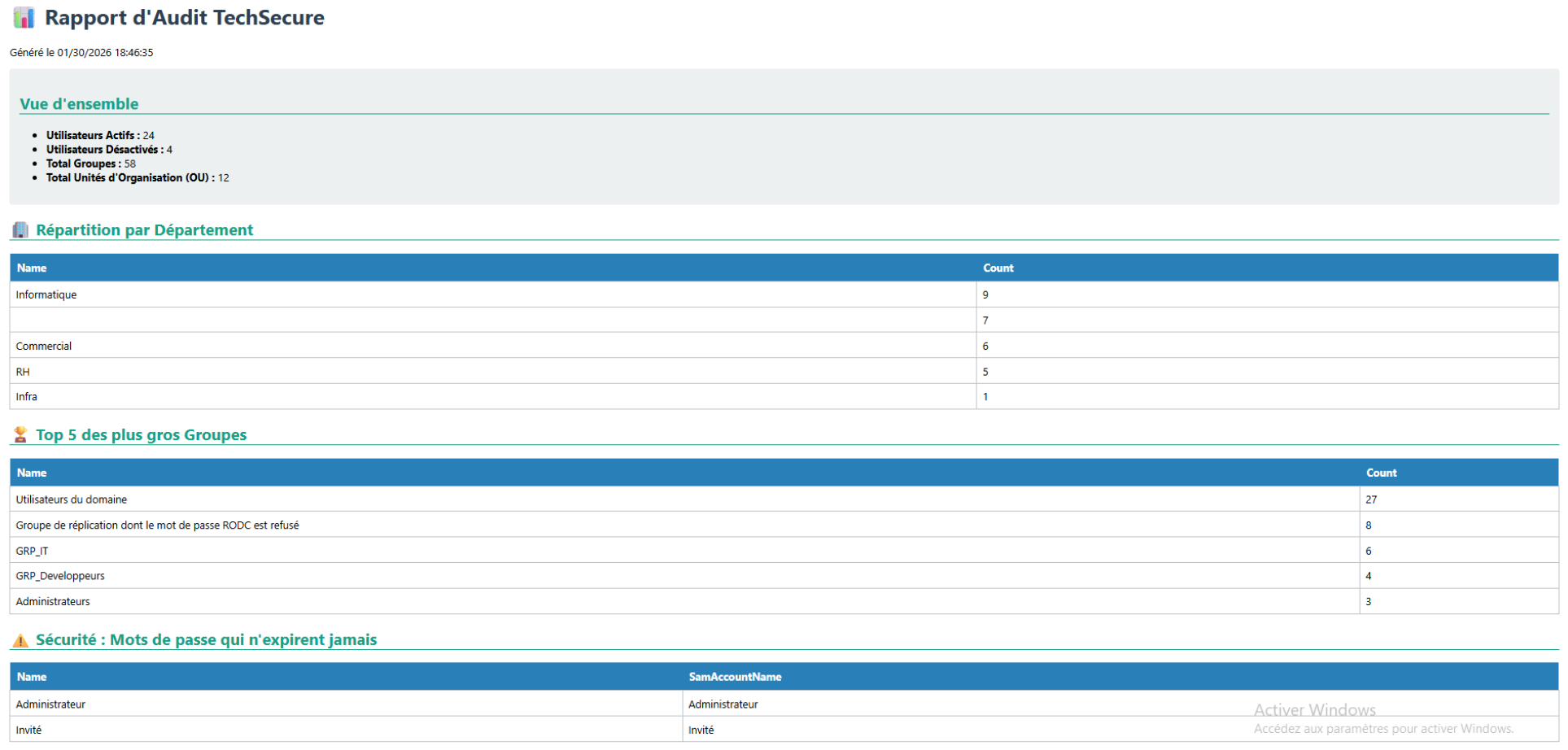
Le script du rapport d'audit complet Get-ADHealthReport.ps1 avec rapport HTML
$HtmlPath = "C:\Scripts\AD\Audit_Complet.html"

Write-Host "Analyse de l'Active Directory en cours..." -ForegroundColor Cyan

# 1. Récupération des données brutes
$UsersAll = Get-ADUser -Filter * -Properties Enabled, PasswordNeverExpires, Department
$UsersActive = $UsersAll | Where-Object { $_.Enabled -eq $true }
$UsersDisabled = $UsersAll | Where-Object { $_.Enabled -eq $false }
$Groups = Get-ADGroup -Filter *
$OUs = Get-ADOrganizationalUnit -Filter *

# 2. Statistiques par Département
$StatsDept = $UsersAll | Group-Object Department | Select-Object Name, Count | Sort-Object Count -Descending

# 3. Top 5 des plus gros groupes (Calcul un peu lent, patience)
$TopGroupes = $Groups | Select-Object Name, @{N='Count';E={(Get-ADGroupMember -Identity $_).Count}} | Sort-Object Count -Descending | Select-Object -First 5

# 4. Construction du HTML
$Style = @"
<style>
    body { font-family: Segoe UI, sans-serif; padding: 20px; }
    h1 { color: #2c3e50; }
    h2 { color: #16a085; border-bottom: 2px solid #16a085; }
    .card { background: #ecf0f1; padding: 15px; margin: 10px 0; border-radius: 5px; }
    table { width: 100%; border-collapse: collapse; margin-bottom: 20px; }
    th { background: #2980b9; color: white; padding: 10px; text-align: left; }
    td { border: 1px solid #bdc3c7; padding: 8px; }
</style>
"@

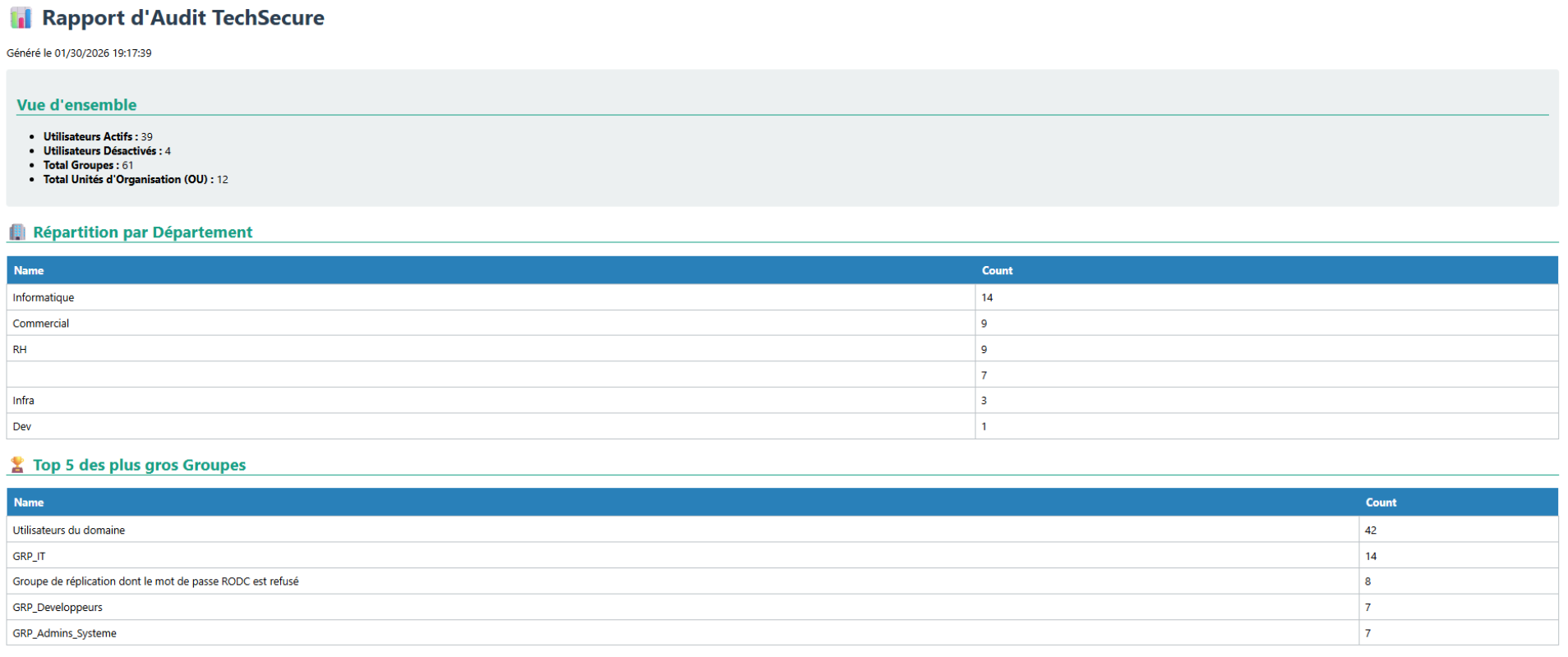
$Content = @"
<html><head><title>Audit AD TechSecure</title>$Style</head><body>
    <h1>📊 Rapport d'Audit TechSecure</h1>
    <p>Généré le $(Get-Date)</p>

    <div class='card'>
        <h2>Vue d'ensemble</h2>
        <ul>
            <li><b>Utilisateurs Actifs :</b> $($UsersActive.Count)</li>
            <li><b>Utilisateurs Désactivés :</b> $($UsersDisabled.Count)</li>
            <li><b>Total Groupes :</b> $($Groups.Count)</li>
            <li><b>Total Unités d'Organisation (OU) :</b> $($OUs.Count)</li>
        </ul>
    </div>

    <h2>🏢 Répartition par Département</h2>
    $($StatsDept | ConvertTo-Html -Fragment)

    <h2>🏆 Top 5 des plus gros Groupes</h2>
    $($TopGroupes | ConvertTo-Html -Fragment)

    <h2>⚠️ Sécurité : Mots de passe qui n'expirent jamais</h2>
    $($UsersAll | Where-Object {$_.PasswordNeverExpires -eq $true} | Select-Object Name, SamAccountName | ConvertTo-Html -Fragment)
</body></html>
"@

$Content | Out-File $HtmlPath
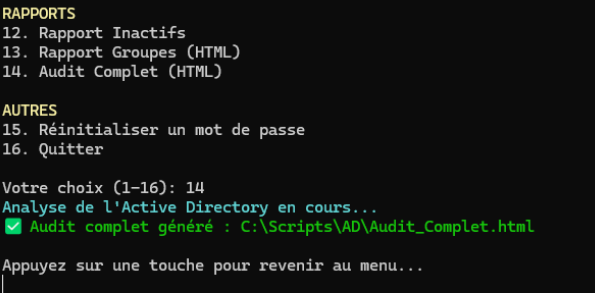
Write-Host "✅ Audit complet généré : $HtmlPath" -ForegroundColor Green
Invoke-Item $HtmlPath

8. Projet final - Outil de gestion AD complet
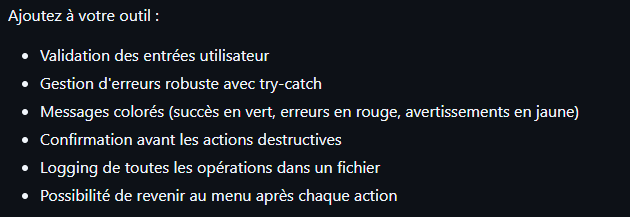
Script du Menu Interactif (Dashboard) AD-Manager.ps1 qui regroupe tous nos outils !
# SYNOPSIS
# Projet Final - Gestionnaire Active Directory TechSecure
# DESCRIPTION
# Menu interactif regroupant toutes les fonctionnalités d'administration.

# --- CONFIGURATION ---
$ScriptPath = "C:\Scripts\AD"
$LogFile = "$ScriptPath\Global_Audit.log"

# --- FONCTIONS UTILITAIRES ---

function Log-Operation ($Message, $Type="INFO") {
    $Line = "[$(Get-Date -Format 'yyyy-MM-dd HH:mm:ss')] [$Type] $Message"
    Add-Content -Path $LogFile -Value $Line
    if ($Type -eq "SUCCESS") { Write-Host "✅ $Message" -ForegroundColor Green }
    elseif ($Type -eq "ERROR") { Write-Host "❌ $Message" -ForegroundColor Red }
    elseif ($Type -eq "WARNING") { Write-Host "⚠️ $Message" -ForegroundColor Yellow }
}

function Pause-Script {
    Write-Host ""
    Write-Host "Appuyez sur une touche pour revenir au menu..." -ForegroundColor Gray
    $null = $Host.UI.RawUI.ReadKey("NoEcho,IncludeKeyDown")
}

function Show-Header {
    Clear-Host
    Write-Host "==========================================" -ForegroundColor Cyan
    Write-Host "    GESTIONNAIRE ACTIVE DIRECTORY (v1.0)  " -ForegroundColor White -BackgroundColor DarkBlue
    Write-Host "==========================================" -ForegroundColor Cyan
    Write-Host ""
}

# --- BOUCLE PRINCIPALE ---
while ($true) {
    Show-Header

    # --- LE MENU ---
    Write-Host "UTILISATEURS" -ForegroundColor Yellow
    Write-Host " 1. Créer un utilisateur (Onboarding)"
    Write-Host " 2. Rechercher un utilisateur"
    Write-Host " 3. Modifier le Titre/Fonction"
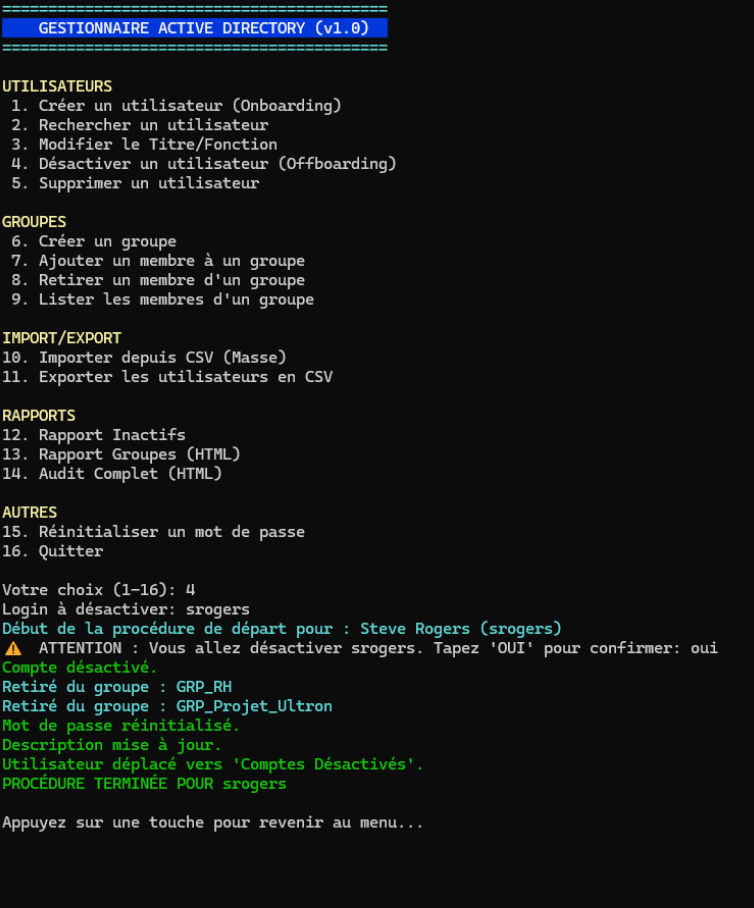
    Write-Host " 4. Désactiver un utilisateur (Offboarding)"
    Write-Host " 5. Supprimer un utilisateur"

    Write-Host "`nGROUPES" -ForegroundColor Yellow
    Write-Host " 6. Créer un groupe"
    Write-Host " 7. Ajouter un membre à un groupe"
    Write-Host " 8. Retirer un membre d'un groupe"
    Write-Host " 9. Lister les membres d'un groupe"

    Write-Host "`nIMPORT/EXPORT" -ForegroundColor Yellow
    Write-Host "10. Importer depuis CSV (Masse)"
    Write-Host "11. Exporter les utilisateurs en CSV"

    Write-Host "`nRAPPORTS" -ForegroundColor Yellow
    Write-Host "12. Rapport Inactifs"
    Write-Host "13. Rapport Groupes (HTML)"
    Write-Host "14. Audit Complet (HTML)"

    Write-Host "`nAUTRES" -ForegroundColor Yellow
    Write-Host "15. Réinitialiser un mot de passe"
    Write-Host "16. Quitter"

    Write-Host ""
    $Choice = Read-Host "Votre choix (1-16)"

    # --- TRAITEMENT DU CHOIX ---
    switch ($Choice) {

        # ---------------- UTILISATEURS ----------------
        "1" {
            Write-Host "--- NOUVEL UTILISATEUR ---" -ForegroundColor Cyan
            $P = Read-Host "Prénom"; $N = Read-Host "Nom"; $T = Read-Host "Titre"; $D = Read-Host "Département (RH/Commercial/Dev/Infra)"; $M = Read-Host "Manager"
            if ($P -and $N -and $T -and $D) {
                & "$ScriptPath\New-Employee.ps1" -Prenom $P -Nom $N -Titre $T -Departement $D -Manager $M
            } else { Log-Operation "Champs manquants" "ERROR" }
        }

        "2" {
            $Recherche = Read-Host "Nom ou Login à chercher"
            Get-ADUser -Filter "Name -like '*$Recherche*' -or SamAccountName -like '*$Recherche*'" -Properties Title, Department, Enabled | Format-Table Name, SamAccountName, Title, Department, Enabled -AutoSize
        }

        "3" {
            $Log = Read-Host "Login de l'utilisateur"
            $Titre = Read-Host "Nouveau Titre"
            try { Set-ADUser -Identity $Log -Title $Titre -ErrorAction Stop; Log-Operation "Titre modifié pour $Log" "SUCCESS" } catch { Log-Operation $_.Exception.Message "ERROR" }
        }

        "4" {
            $Log = Read-Host "Login à désactiver"
            & "$ScriptPath\Remove-Employee.ps1" -Login $Log
        }

        "5" {
            $Log = Read-Host "⚠️ Login à SUPPRIMER DEFINITIVEMENT"
            if ((Read-Host "Confirmez-vous la SUPPRESSION de $Log ? (OUI/NON)") -eq "OUI") {
                try { Remove-ADUser -Identity $Log -Confirm:$false -ErrorAction Stop; Log-Operation "$Log a été supprimé." "SUCCESS" } catch { Log-Operation $_.Exception.Message "ERROR" }
            }
        }

        # ---------------- GROUPES ----------------
        "6" {
            $NomGrp = Read-Host "Nom du nouveau groupe (ex: GRP_Stagiaires)"
            try { New-ADGroup -Name $NomGrp -GroupScope Global -Path "OU=Groupes,OU=TechSecure,DC=TECHSECURE,DC=LOCAL"; Log-Operation "Groupe $NomGrp créé" "SUCCESS" } catch { Log-Operation $_.Exception.Message "ERROR" }
        }

        "7" {
            $Grp = Read-Host "Nom du Groupe"; $Usr = Read-Host "Login Utilisateur"
            try { Add-ADGroupMember -Identity $Grp -Members $Usr; Log-Operation "$Usr ajouté à $Grp" "SUCCESS" } catch { Log-Operation "Erreur d'ajout" "ERROR" }
        }

        "8" {
            $Grp = Read-Host "Nom du Groupe"; $Usr = Read-Host "Login Utilisateur"
            try { Remove-ADGroupMember -Identity $Grp -Members $Usr -Confirm:$false; Log-Operation "$Usr retiré de $Grp" "SUCCESS" } catch { Log-Operation "Erreur de retrait" "ERROR" }
        }

        "9" {
            $Grp = Read-Host "Nom du Groupe"
            try { Get-ADGroupMember -Identity $Grp | Select-Object Name, SamAccountName | Format-Table } catch { Write-Host "Groupe introuvable" -ForegroundColor Red }
        }

        # ---------------- IMPORT / EXPORT ----------------
        "10" { & "$ScriptPath\Import-Pro.ps1" }

        "11" {
            $Path = "$ScriptPath\Export_Users.csv"
            Get-ADUser -Filter * -Properties Title, Department | Select-Object Name, SamAccountName, Title, Department | Export-Csv -Path $Path -NoTypeInformation -Encoding UTF8
            Log-Operation "Export terminé : $Path" "SUCCESS"
        }

        # ---------------- RAPPORTS ----------------
        "12" { & "$ScriptPath\Get-InactiveUsers.ps1" }
        "13" { & "$ScriptPath\Get-GroupsReport.ps1" }
        "14" { & "$ScriptPath\Get-ADHealthReport.ps1" }

        # ---------------- AUTRES ----------------
        "15" {
            $Log = Read-Host "Login de l'utilisateur"
            & "$ScriptPath\Reset-EmployeePassword.ps1" -Login $Log
        }

        "16" {
            Write-Host "Au revoir !" -ForegroundColor Green
            break
        }

        Default { Write-Host "Choix invalide." -ForegroundColor Red }
    }

    Pause-Script
}
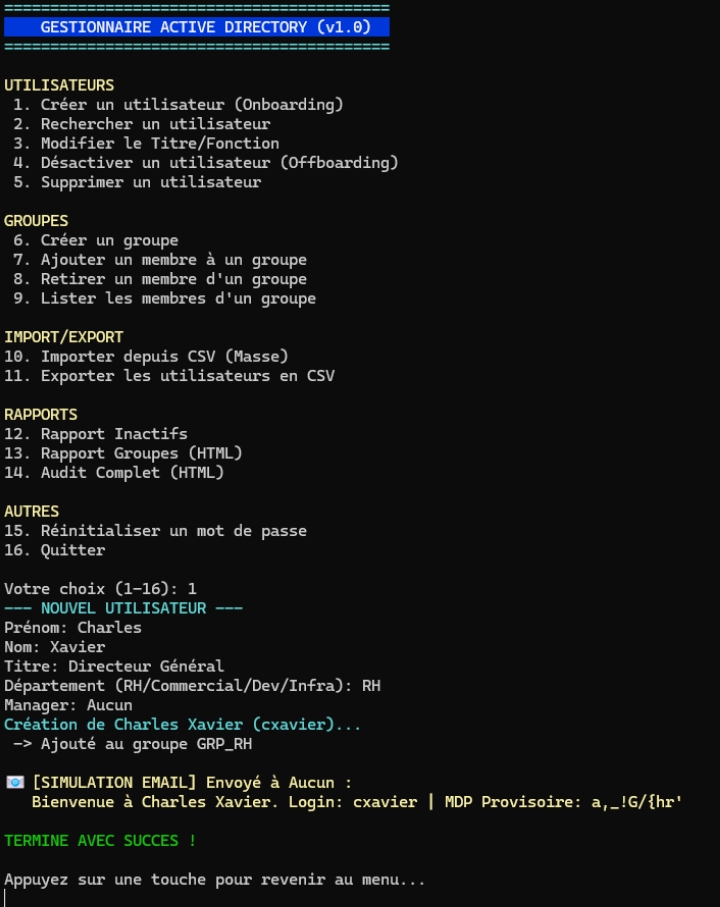
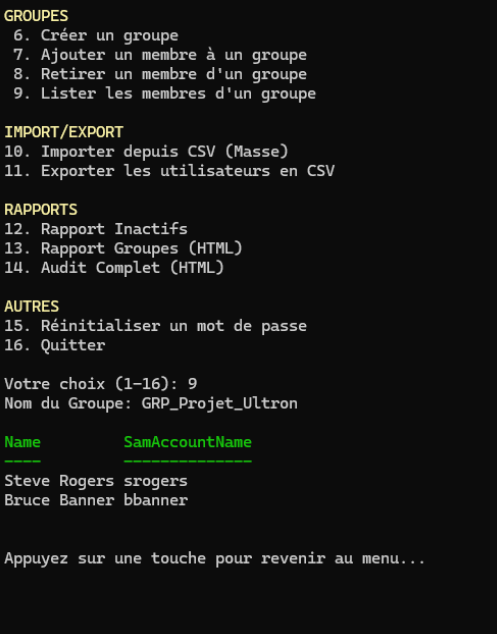
Test du Menu
Ajout utilisateurs
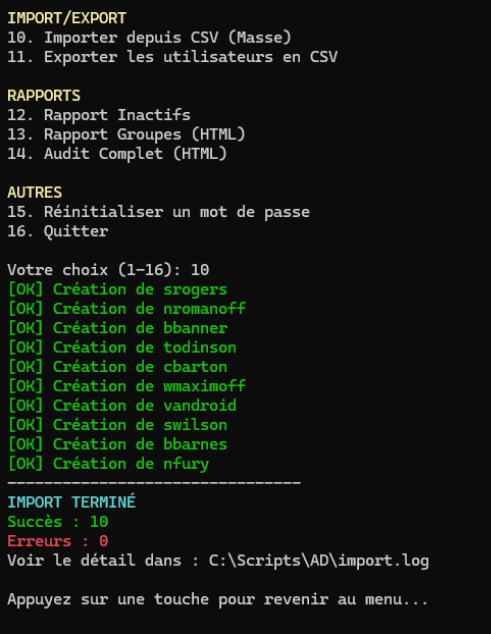
Import CSV (nouveaux utilisateurs)
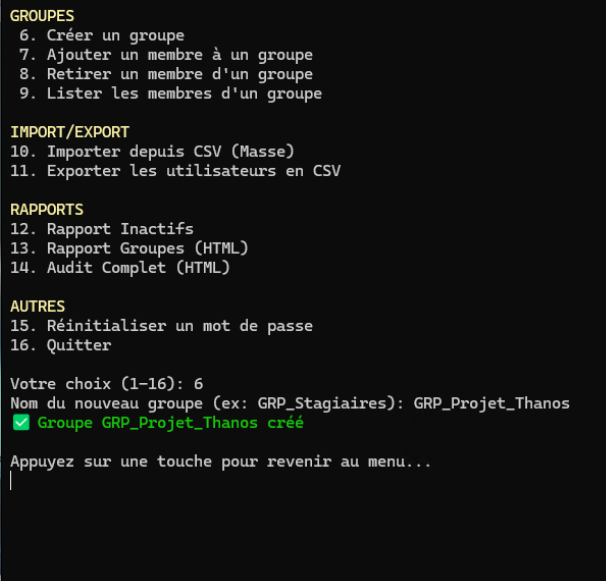
Ajout de Groupes
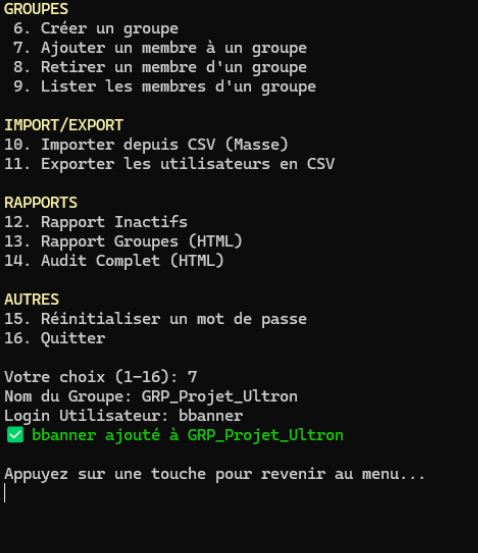
Ajout de Membres aux groupes
Vérification
Génération du rapport complet
Désactiver un utilisateur